BoredomBusted — Find Your Next Favorite Thing To Do
Discover hobbies, activities, places, and ideas that spark joy. Whether you're looking for something creative, active, social, or relaxing, BoredomBusted helps you find your next favorite thing to do.
Browse our hobby guides, things-to-do collections, and place ideas to never be bored again.
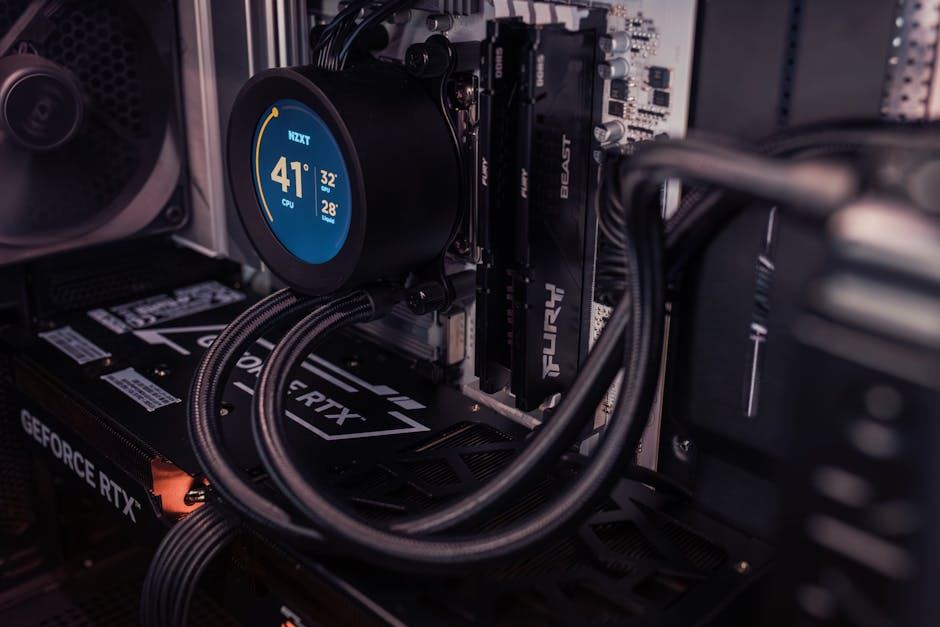
PC gaming is often seen as a solitary pursuit, but its real power lies in creating fast feedback loops that warp time and deepen social bonds.
Getting started with PC gaming as a beginner opens up a diverse world of interactive entertainment, from casual puzzles to competitive multiplayer titles.
Unlike consoles, the hardware itself is part of the hobby: you choose, upgrade, and optimize your setup, which makes the experience more customizable but also more involved than plug-and-play alternatives.
In PC gaming, individuals engage with high-performance computers to play various genres of games, using peripherals like keyboards and mice to execute precise actions such as aiming, building, and strategizing. They may adjust hardware settings and optimize game performance while participating in immersive experiences that require real-time decision-making and tactical analysis, often spanning se…
PC gaming effectively combats boredom through immediate skill feedback loops, where precise actions yield measurable outcomes, creating a sense of accomplishment. This engagement fosters a flow state, where time seems to distort as players tackle challenges, while community interactions provide social belonging, enhancing the overall experience.
You think PC gaming is for people who spend $3,000 on a glowing tower and argue about frame rates online. That version has kept you at bay before you've even tried it.
Most PC gamers are on modest hardware. A secondhand laptop, or a machine built for under $500 is enough for playing everything. And here's something that'll change your perspective: the library is vast. Thousands of games cost less than a coffee, are always on sale, and offer genres console players just don't see.
Customization is about more than showing off—it's about control. You're in charge of how it looks, how it runs, even what mods tweak your gaming experience. And whether you play with a controller or a keyboard is entirely your choice.
A friend of mine runs a mid-tier PC he built three years ago for around $400. He plays sprawling RPGs, indie puzzle games, and older titles he missed the first time – all of it, no subscription, on his own terms.
The cost question is real, though – and it's more answerable than you think. That's exactly where we're going next.
Playing a PC game for the first time feels clumsy and awkward. It's disorienting to watch someone who seems smooth when your own hands aren't synced with your brain.
Settings menus pop up everywhere, mouse sensitivity feels wrong, and your keyboard hand hovers awkwardly. Meanwhile, some player online makes it look effortless.
Gradually, the basics settle into muscle memory. Sensitivity starts to feel just right. Your victories start to feel deserved.
Expect frustration and clumsiness. It's part of adjusting. Every seasoned player has felt this way, even if they don't show it.
Before diving in, set your mouse DPI to 800 and adjust your in-game sensitivity between 3–6. Consistency beats chasing 'pro settings' at this stage. The next part tackles mistakes you can avoid when gaining speed.
When to start: Morning
Duration: 1-2 hours
Cost to try: $0
Success criteria: if you finished without quitting midway, do session 2.
Most beginners assume more GPU = better PC gaming, then end up with a $400 graphics card running Stardew Valley and indie roguelikes.
Spend on CPU and RAM first – the GPU only matters when you know the resolution and frame rate you're actually targeting.
Games ship with settings tuned for marketing screenshots, not for your specific hardware running smoothly.
Open the in-game settings and drop shadows and ambient occlusion first – those two alone can double your frame rate without touching anything else.
Wi-Fi feels fine until you're mid-session and inexplicably losing – and most beginners never connect the lag to the connection.
Run one gaming session wired and compare ping in-game; a $15 ethernet cable fixes a problem no amount of PC upgrades can.
Steam, Epic, GOG, Discord, and the Xbox App all want to run at startup. Most people never turn any of them off.
They quietly eat RAM before your game even opens. Go to Task Manager → Startup Apps and disable every launcher you don't need running constantly. Let them open when you open them.
60Hz monitor, 200 frames per second – you're generating heat, burning GPU budget, and feeling none of it.
Check your monitor's refresh rate first, then cap your in-game FPS to match using your GPU control panel or the game's own frame limiter.
Most of your PC gaming probably happens at home. Your desk, your rules.
But consider gaming cafes and esports arenas. Most mid-sized cities have them, offering a chance to mingle and play with others.
The National Esports Association (NEA) is a major organizer in the US. They handle scholastic and amateur competitions.
College players should look into NACE (National Association of Collegiate Esports) to find campus programs.
Joining a LAN event or Discord server is simpler than you think. Lead with your game and hours played.
A line like "I've got about 80 hours in [game], still learning the basics" helps them find the right fit for you on day one.
Story-driven experiences with no strangers yelling at you. Play at your pace, pause anytime, and quit without consequences.
Ideal for relaxing or new players without a steep learning curve.
A mid-range PC suffices, so no need for a fancy $1,500 setup.
Games like Valorant, CS2, or League of Legends pit you against real players. Losing is very public, and the skill ceiling is high.
For those who thrive on competition and can handle a tough start.
High refresh-rate monitors (144Hz+) are essential here.
Emulate old console games like SNES, PS2, or GameCube on your PC. It's technically impressive and often free, though the legality of game sourcing can be tricky.
Perfect for those nostalgic for classic gaming or exploring its history.
Simulation games like flight sims or racing sims reward patience and precision.
Great for those who appreciate depth and intricate details over action.
Specialized gear like a HOTAS joystick or racing wheel ranges from $150–$600, so consider trying before buying.
Stream games from remote servers. It hinges on a strong internet connection, and input lag can be an issue.
Suited for those curious about PC gaming without committing to hardware.
Readers who enjoy this often gravitate toward Simulation Gaming next.
Another variant that pulls from the same roots is Roguelike Gaming.
Console Gaming is a sibling pursuit and often surfaces the same kind of curiosity.
Some of the same instincts show up in MMORPG Gaming — worth a look if this clicked.
Readers who enjoy this often gravitate toward Fighting Game Competition next.
Reading your input lag is the game-changing skill. You must notice, in real time, how your actions on the controls get mirrored on screen, and identify what's causing any delay.
Discern between a choppy framerate and sluggish mouse movement. Once you hone this awareness, focus shifts from skill doubts to direct solutions.
Ignore it, and you risk months of pointless practice on a 60Hz monitor running at 40fps. Meanwhile, you wonder why your game feels off.
Quick learners aren't inherently better; they just identify problems quicker.
Try 12 sessions within 30 days, aiming for around three hours per week. This frequency helps you get familiar with the game's controls, interface, and genre.
If you keep thinking about the game between sessions – replaying decisions or dreaming about different builds – that's not simple distraction. It means the hobby has captured your interest. Start focusing on a specific genre and dive deeper to hone your skills.
If your sessions felt neutral, like just another task without excitement, there's likely a mismatch with the genre, not the hobby itself. Try a completely different type of game before deciding it's not for you.
If sitting down to play feels like a chore each time, and relief is your main emotion afterward, trust that feeling. Not every hobby fits every person. The solo nature and long feedback loops of PC gaming aren't appealing to everyone.
You're watching YouTube videos about games you don't own. Reading patch notes or build guides at odd hours with no practical need. That curiosity is the real signal you're hooked.
A dedicated setup just isn't feasible in your current living situation. Sharing space or lacking the right equipment brings more frustration than fun long before genuine enjoyment kicks in.
Needing physical movement or social interactions means PC gaming may drain rather than recharge you. It's inherently sedentary and often solitary, which isn't a fixable habit.
Concerns about repetitive strain or wrist issues are valid. Managing those pains is crucial because long sessions are part of the gaming experience, making ergonomics essential from the start.
PC Gaming is a deeper commitment than most boredom cures — for lighter options, check things to do when bored.
PC Gaming is a deeper commitment than most boredom cures — for lighter options, check things to do when bored.
You can start PC gaming with a budget of $600–$1,500 for a gaming PC, though entry-level gaming PCs can be found for $400–$600, and high-end systems can exceed $2,000. Most games are affordable ($20–$60), and many quality titles are free-to-play. Digital storefronts like Steam frequently offer sales, making games even more accessible.
At minimum, you'll need a dedicated graphics card (GPU), a multi-core processor (CPU), 16GB RAM, and a solid-state drive (SSD). For 1080p gaming at 60+ fps, an RTX 3060 or equivalent GPU paired with a mid-range CPU works well; competitive or high-resolution gaming requires more powerful components. Your specific needs depend on the games you want to play and your target resolution and frame rate.
You can start playing within hours of setting up your PC and installing a game—most modern titles are playable immediately. However, mastering game mechanics, competitive skills, or engaging with modding communities takes weeks or months depending on your investment level and the complexity of the games you choose.
PC gaming itself isn't difficult—most games have adjustable difficulty settings and tutorials for newcomers. The steeper learning curve is often in building or upgrading a PC, though pre-built gaming PCs eliminate this concern. Many popular games cater to casual players, so you can start with beginner-friendly titles and progress at your own pace.
PC gaming offers superior graphics potential, customization through mods, a larger library including indie games, and keyboard/mouse precision controls. Consoles provide a simpler plug-and-play experience with exclusive titles and lower upfront costs. PC gaming also supports multiple input devices and has a stronger competitive esports community.
Yes, PC gaming has a thriving modding community where players create custom content ranging from visual enhancements to entirely new gameplay mechanics and storylines. Popular games like Skyrim, Minecraft, and Cyberpunk 2077 have thousands of community-created mods available on platforms like Nexus Mods and Steam Workshop. This is one of PC gaming's biggest advantages over other platforms.