BoredomBusted — Find Your Next Favorite Thing To Do
Discover hobbies, activities, places, and ideas that spark joy. Whether you're looking for something creative, active, social, or relaxing, BoredomBusted helps you find your next favorite thing to do.
Browse our hobby guides, things-to-do collections, and place ideas to never be bored again.
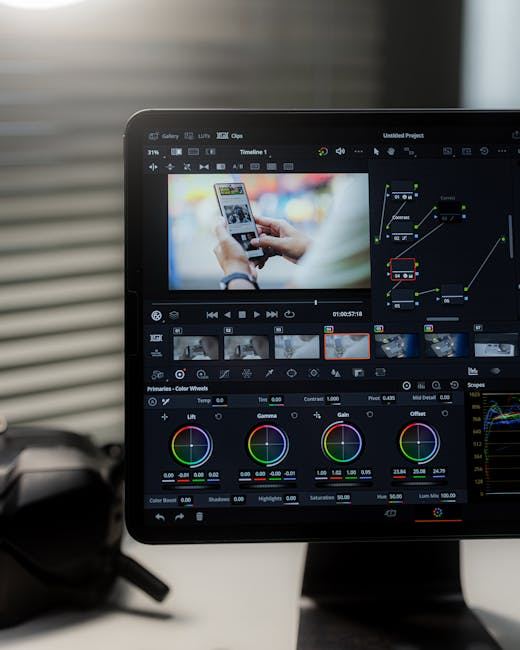
Video editing isn't just about cutting clips; it’s about controlling emotional tempo—same footage can evoke laughter or fear with just a different cut or music timing.
Getting started with video editing as a beginner involves understanding the fundamentals of selecting and arranging raw footage to tell your story.
You work in a timeline-based software, cutting clips, syncing audio, and controlling pacing until the sequence feels intentional.
Unlike photography or filmmaking, the creative work happens entirely after the camera stops – your raw material is already captured, and your job is shaping what it means.
In video editing, hobbyists import raw footage into software like Adobe Premiere Pro or DaVinci Resolve, manipulating clips on a timeline by dragging, trimming, and layering elements such as sound effects and graphics. They preview their edits, adjust audio levels, and experiment with visual effects, ultimately rendering polished videos for sharing on platforms like YouTube.
Video editing induces a flow state through focused, immersive sessions where hobbyists experience skill feedback loops, witnessing their rough cuts evolve into refined sequences. This process fosters creative expression and a sense of accomplishment, as they complete lengthy projects and engage with online communities, combating isolation while enjoying the novelty of diverse editing tasks.
You think video editing is about cutting clips together. Maybe slapping on a song, trimming the awkward pauses, done.
That assumption is why most people's first videos look fine — and feel completely dead.
Editing doesn't assemble footage. Editing controls the emotional tempo of the entire piece — the same raw clips can feel tense, funny, or heartbreaking depending entirely on when you cut and what you cut to.
Color, sound design, and pacing aren't polish you add at the end. They're the language the video is speaking from frame one. Every choice you don't make is still a choice — holding on a face, letting a shot breathe, leaving a pause in. Those are the moves that make people feel something.
Take a 10-second clip of someone opening a door.
Comedy or horror.
Same footage, zero changes to the shoot.
Swap the music timing and shift where the cut lands — the entire experience flips. That's not a special effect. That's just editing.
This applies whether you're cutting a travel vlog or a short film. The genre doesn't change the underlying decisions — it just changes the context those decisions live in. What gear and software you need to start making those decisions is simpler than the industry wants you to believe.
Watching a polished edit feels effortless. Someone cuts to the beat, the color pops, the story just moves – and it looks like they're barely doing anything.
Then you open the software and spend 40 minutes figuring out how to import a clip.
The first few sessions are frustrating in a specific way. The timeline is a mystery, every export looks wrong, and audio sounds like you recorded it inside a cave. The gap between "I have footage" and "I have a story" is where most beginners quietly close the tab – and it has nothing to do with the software being complicated.
By week two, cuts start landing roughly where you want them. By week three, audio becomes the thing you can't unhear – bad levels, room noise, mismatched clips. Most people wish they'd paid attention to audio from day one, not week three.
By week four, something shifts. You watch something you made and don't immediately hate it – cuts feel like decisions, the rough version is actually watchable, and you start hearing the edit instead of just seeing it. That milestone is bigger than it sounds. Before you get there, though, set your timeline frame rate to match your footage before you drop anything in. If they don't match, audio slides out of sync and cuts land wrong. You'll spend an hour diagnosing a problem that was baked in from minute one.
The next section covers the mistakes that keep people stuck in the frustrating half – longer than they need to be.
When to start: Early morning
Duration: 1-2 hours
Cost to try: $20
Success criteria: If you can import 5 clips, place them in a 30-second sequence, and add 2 clean transitions, do session 2.
New editors wait until a movement finishes before switching shots. That instinct makes every cut feel sluggish and the sequence feel slow.
Cut 2–4 frames into the motion, not after it. Your brain fills in the rest — and the edit disappears.
You filmed it, so it feels important. But the audience has already understood the shot — they're just waiting for you to move on.
Find the last frame that adds new information. Cut exactly there — not three seconds later.
Wipes, spins, and glitchy flashes feel like editing. They're actually just covering up the fact that the clips don't connect yet.
Default to the straight cut for everything. Only add a transition when you can explain exactly why that specific moment needs one.
Most beginners treat audio as a finishing step. That's how you export a video where the music buries the voiceover — and viewers leave in the first 20 seconds.
Set the rule before you do anything else. Dialogue peaks at -12dB, music sits at -18dB to -20dB — and check it on headphones, not your laptop speakers.
The timeline looks sharp. The export looks muddy — and nobody ever explained why.
The problem is almost always bitrate. Export H.264, set bitrate to at least 16 Mbps for 1080p, and match your export frame rate exactly to your timeline frame rate.
Video editing happens wherever your laptop does — a home desk, a coffee shop, a library. There's no venue to find, no membership to check.
Search "video editing meetup [your city]" on Meetup.com and filter by "creative" or "film." You'll find both casual editing nights and critique groups within a few clicks.
There's no single national body for amateur editors in the US. The Motion Picture Editors Guild (IATSE Local 700) is union-focused, but it publishes resources and events worth bookmarking if you're serious about the craft.
Tell the group you're new and ask what software everyone's using. That one question signals you're practical, not precious — and usually gets you a mentor-style conversation before the night's over.
This is the closest thing to "classic" editing – you're cutting dialogue, building scenes, controlling pacing for a story.
It demands the most craft, but it also teaches you the most. Best for people drawn to storytelling over content creation.
This is the variant that actually makes you a better editor across everything else.
Fast cuts, graphics, captions, energy – the goal is retention, not artistry.
It's less about cinematic feel and more about keeping someone from clicking away in the first eight seconds. Best for anyone who wants an audience quickly or already has something to say.
The skills transfer well, but don't mistake speed for simplicity – pacing for social is its own discipline.
You're not cutting footage – you're building visual elements that move.
Think animated logos, text overlays, kinetic typography. Best for designers or anyone who finds pure editing too passive.
Expect a steeper software learning curve; After Effects is the standard, and it's genuinely complex.
This is a specialty within editing, not a replacement for it – you're adjusting tone, mood, and visual consistency across a project.
Best for people with a strong visual eye who want to go deep on one skill.
DaVinci Resolve has a free version that's industry-standard for grading, so cost isn't the barrier here – patience is.
Mostly audio-driven work with talking-head footage or b-roll layered on top.
It's the most approachable variant for beginners – if you can cut out the "ums" and silences, you're already doing the job.
Best for people who want to build editing habits without the pressure of complex visual storytelling.
Another variant that pulls from the same roots is Fashion Photography.
If this resonates, Marker Drawing explores a similar direction.
Most beginners obsess over transitions and color grading – the stuff that looks like editing. The real lever is pacing: knowing exactly when to cut, and why.
Pacing is the ability to feel when a shot has expired – when the viewer has absorbed what they need and their attention is already leaving. It's not about cutting fast or slow. It's about cutting at the last useful frame, every single time.
Once you develop this instinct, your edits stop feeling like slideshows with music slapped on top – they start feeling like a single continuous thought. Without it, you can have perfect color, cinematic transitions, and a great subject, and the video will still feel weirdly exhausting to watch.
Viewers can't tell you your cuts are late. They just click away and don't know why.
Commit to 8 sessions over 30 days — roughly twice a week. That's enough time to move past software confusion and actually touch something creative, which is where the signal lives.
If you keep opening the app between sessions — not because you have to, but because a cut bothered you or you want to try something you saw — that's the hobby. The move now is a small project with a real deadline, even a self-imposed one.
If the sessions ended and nothing pulled you back, that's honest data. Video editing rewards people who find the puzzle satisfying, not just the finished product. If the process felt like admin work, more sessions won't change that.
If you actively dreaded sitting down, that's a clean answer — not a character flaw. Some people find they love making videos but hate the editing side, which points toward collaboration rather than walking away from the creative work entirely.
The sign worth paying attention to: you're watching YouTube videos and mentally re-editing them — noticing where a cut was off, why a transition felt wrong, how you'd have structured it differently. That low-level critical attention is exactly what editing trains, and you already have it.
No reliable access to a capable computer is the first one. Mobile editing exists, but hitting a hard ceiling before the hobby gets interesting kills momentum fast — and mobile hits that ceiling early.
A schedule built entirely on short, unpredictable windows is the second. Editing builds on itself — a project you abandon for two weeks loses context, and restarting repeatedly is genuinely demoralizing.
Needing immediate, visible results to stay motivated is the third. Your first few projects will look worse than what you imagined. That gap between taste and skill is stubborn, and it doesn't close in a month.
When you don't want to commit, things to do when bored is a better starting point.
Beginners can start with free options like DaVinci Resolve, CapCut, or OpenShot before investing in professional tools like Adobe Premiere Pro or Final Cut Pro. The right choice depends on your budget and whether you're editing on desktop or mobile—most free software handles 4K footage and basic color grading well.
You can learn basic editing skills like cutting, transitions, and color correction in 2–4 weeks with consistent practice. Mastering advanced techniques like motion graphics, sound design, and professional workflows typically takes 3–6 months of regular work on real projects.
You can edit on any modern computer (Windows, Mac, or even a tablet), though a decent processor and at least 8GB of RAM helps with smooth editing. A larger monitor and external storage for raw footage become more important as you work with longer or higher-resolution projects.
Video production includes planning, filming, and post-production, while video editing specifically focuses on assembling, trimming, and enhancing existing footage. As a hobby, you can start with editing raw footage from your phone or downloaded clips without filming yourself.
Video editing has a gentle learning curve—most software interfaces are intuitive, and you can create watchable edits within days of starting. The challenge comes later when perfecting pacing, sound mixing, and storytelling, but beginners typically grasp the fundamentals quickly.
A single hour of 1080p footage takes roughly 30–50GB, while 4K can demand 100–200GB per hour depending on compression. Most editors invest in external hard drives or SSDs (1–4TB) to store raw footage separately from their project files.